Are you looking for the best 3D printer for miniatures? Speed, reliability, and resolution are the top 3 features you should be looking at. Enter the Elegoo Mars 5 Ultra: a promising tool for those looking to efficiently print highly detailed miniatures. I had the amazing opportunity to drive this printer through a number of tests, creating miniatures in multiple scales and levels of details.
In this article, I share my multi-week experience using this printer. Suffice it to say, I was shocked at how far the 3D printing world has come in terms of bringing this technology to us in such a compact package and at such a low cost. Read on to learn more about what I think about this printer, and how it may serve your needs as an artist, miniature hobbyist, and tabletop gamer.

Disclaimer: Elegoo offered me a chance to review their new Mars 5 Ultra 9K printer, and I was particularly intrigued by its combination of speed and quality. Of course, my opinions remain my own, and this review reflects my honest experiences with the printer. Whether you’re a seasoned enthusiast or just getting into 3D printing, I hope my insights help you decide if the Mars 5 Ultra 9K is the right fit for your creative workflow.
Key Takeaways: Do YOu BUY The 3D printer or not?
- The Elegoo Mars 5 Ultra combines 9K resolution with fast print speeds, making it a great choice for miniature hobbyists. There’s a rising thrill of seeing a model emerge from a vat of liquid resin.
- We’re living in the future: Automated everything. You have auto-leveling, a tilt-release feature to help ensure reliable prints, and live AI camera monitoring over the internet. Together, this makes the Mars 5 a future tech you can experience today.
- For under $300, the Mars 5 Ultra delivers print quality that rivals commercially mass-produced miniatures. The default resolution is enough to allow you to prepare miniatures for painting without a complicated surface smoothing steps.

Recommendation: Buy 100%. This is the total package. The Mars 5 Ultra is easy to setup, operate, and kicks out prints at high resolution without much input from you. Yes, you’ll have a learning curve if you’re new to printing miniatures, especially with resin, and you may come wanting for a larger build volume (this is a desktop sized, compact printer); but, if you can live and learn within these limitations—I did—you’ll love the Elegoo Mars 5 Ultra.

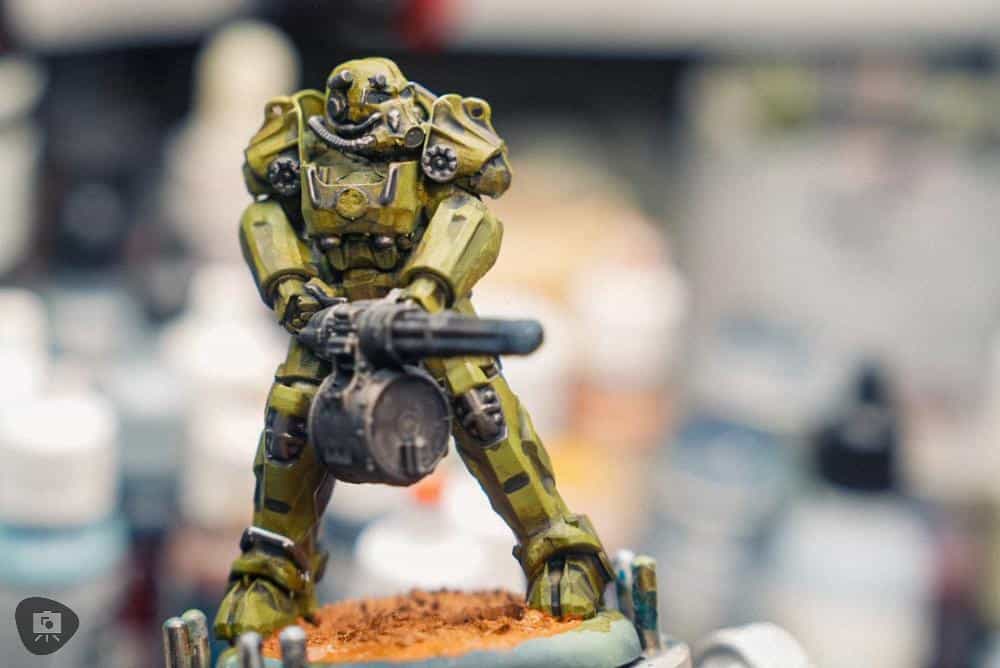

First Impression of the Elegoo Mars 5 Ultra
My first impression during the unboxing of the Elegoo Mars 5 Ultra was excellent. The printer was neatly packaged, and included all the essentials: gloves, filters for resin, forceps, and a plastic scraper for removing prints. You will need things for the post-processing steps. But these are common household products that aren’t expensive and easy to find at local stores or online (more about this below).

Build quality
The build quality was impressive, and everything felt sturdy. There are a lot of parts at first glance, but truly there’s no real assembly required. Just follow the quick start instructions to screw down the resin tray (which holds your liquid, uncured resin), and learn how to lock-in the build plate.


Super high resolution projector for smoother looking prints
When I first heard about the printer, the marketed 9K resolution projector immediately caught my attention. The bottleneck for any resin 3D printer for miniatures has always been the quality of the projector (e.g., or on older systems, the utility of lasers), which is what creates the UV light that “cures” the resin through the FEP membrane of the resin tank.

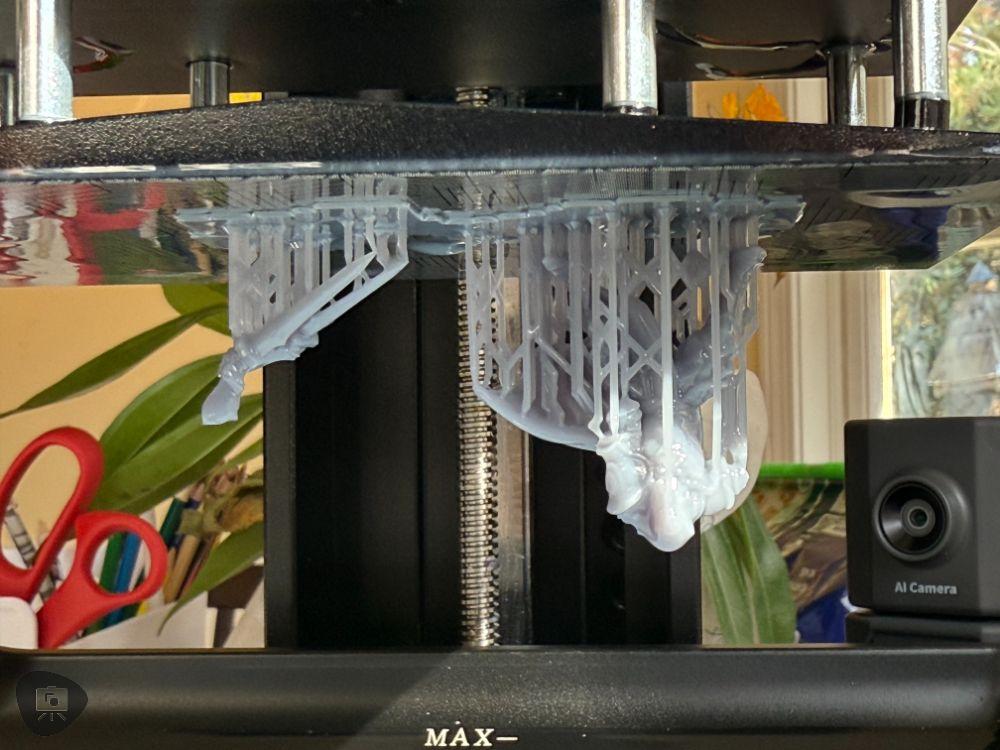
The FEP membrane in a resin tank is a thin, transparent film made from fluorinated ethylene propylene (FEP), a type of polymer. It plays a critical role in resin-based 3D printing, especially for SLA (stereolithography) and MSLA (masked stereolithography) printers. The membrane serves as the non-stick interface between the liquid resin and the build platform.

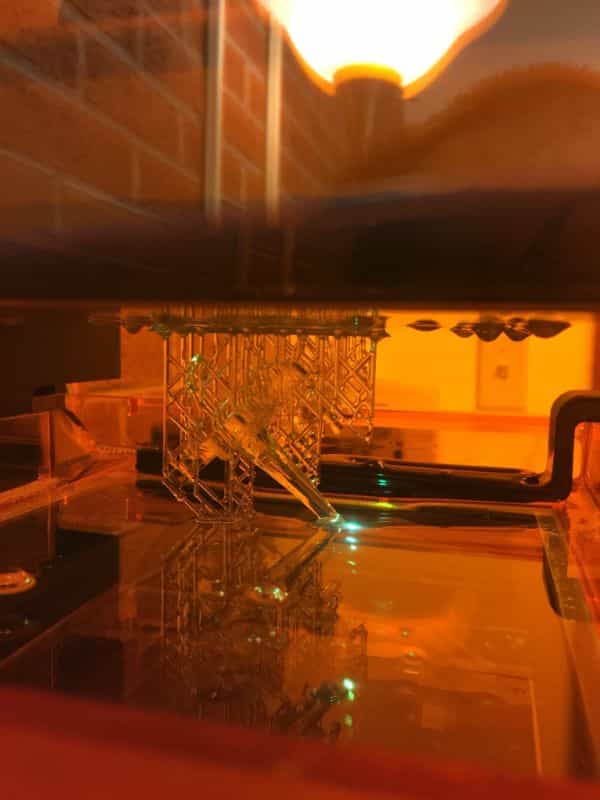
A 9K resolution means that emitted light below the resin tank produces high sharply detailed layers, e.g., clean-edged shapes, quickly and reliably. When layers are stacked together over time, the result is an amazingly detailed miniature that holds tons of detail.


The design of the Mars 5 Ultra is robust, and the inclusion of thoughtful accessories made the setup process seamless. For safety, I particularly appreciated the gloves which came in handy when pouring and cleaning up any stray liquid resin.

As a note, you’ll need to get isopropyl alcohol (>90%) for cleaning up resin from freshly printed miniatures and washing tools or any stray resin-drips that got away from you. More about this below.

6 Must-Know Key Features
The Mars 5 Ultra is a high-resolution 3D printer that uses resin as its primary building material. It’s ideal for those planning to print detailed models at small scales, whether for tabletop gaming, dioramas, or fine art. If you’re an artist or hobbyist looking to expand your creative toolkit with a high-end gadget for your home studio, the Mars 5 Ultra is a great option.

- 9K Monochrome LCD: The Mars 5 Ultra comes equipped with a 7-inch 9K monochrome LCD, delivering an XY resolution of 18 microns (0.018 mm). This level of precision is perfect for capturing intricate armor details, delicate facial expressions, or tiny textures.
- Tilt-Release Technology: This feature minimizes suction forces during printing, improving print reliability. It’s a huge time saver, reducing failed prints and making the entire experience more enjoyable.
- Automatic Leveling: The Mars 5 Ultra’s one-click automatic leveling simplifies setup, ensuring that you get straight into printing without having to wrestle with adjustments. Although it’s automatic, I still found it helpful to manually verify the leveling, especially for more complex prints.
- AI Camera Monitoring: The built-in AI camera monitors the printing process in real-time, providing notifications if issues like empty build plates or model warping occur. This feature was invaluable, especially during longer print jobs when I couldn’t supervise constantly.
- Build Volume: The printer offers a build area of 153.36 x 77.76 x 165 mm, ample for most miniature and model projects.
- Connectivity: USB and Wi-Fi connectivity allow for convenient file transfers and remote monitoring, making it easy to manage prints without being tethered to the machine. I did initially face some connectivity issues—specifically with my Wi-Fi signal strength. Moving the printer closer to my router and upgrading my Wi-Fi antenna resolved this problem entirely.


Hands-On Performance Review 3D Printing Miniatures
When I first unboxed the Mars 5 Ultra, I honestly felt a bit intimidated.
From my past experiences with older 3D printers, I remembered lengthy calibration processes and days of trial and error. However, the Mars 5 Ultra setup was surprisingly straightforward—with a little help from YouTube tutorials and Elegoo’s official guides, I got the printer up and running quickly.


One key element of the setup was leveling the printer properly. Although the Mars 5 Ultra has automatic leveling, I learned that ensuring the printer and the surface it sits on are both level is crucial. I placed my 3D printer on a sturdy kitchen table. Not the greatest place, as resin fumes and spills are toxic. But, I took precautions as you’ll see.


Also, because this area of my home is near a lot of windows, I also kept the printer covered with a thick blanket to protect any excess exposure to sunlight. UV from sunlight is powerful stuff, and can prematurely cure resin. This can lead to problems. Protect your printer from natural light! Keep it in the dark as much as possible.


printing…Easy.
It bears repeating: The high-resolution printing capability of the Mars 5 Ultra is what stands out most.
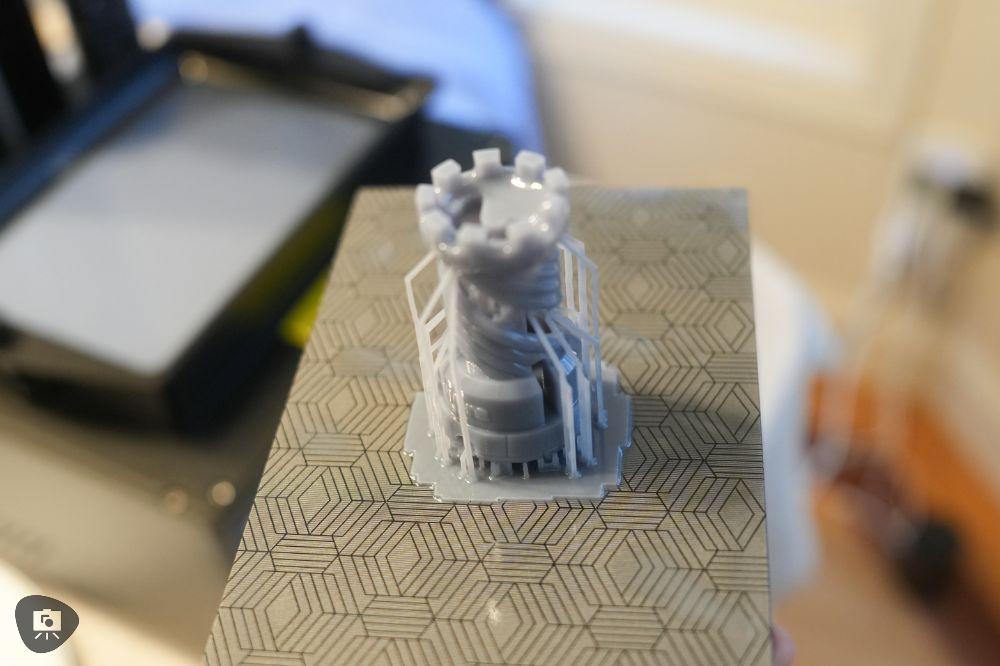

Achieving layer thicknesses below 0.1 mm was the default and worked perfectly for capturing the fine details I wanted in the final 3D printed model. Of course, super thin layers make miniatures easier to paint, eliminating the need for sanding or applying multiple layers of filler and primer to hide coarse lines.
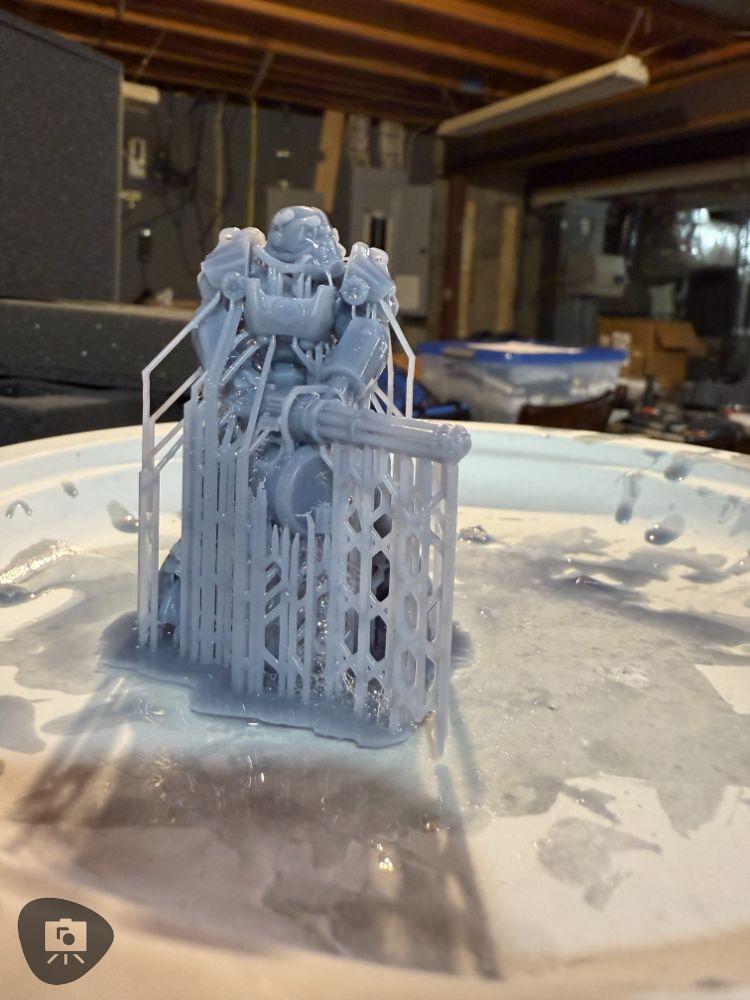


Thinner! Less is more!
Intrigued by the possibilities, I experimented with even thinner layers—down to 0.05 mm. At 0.05 mm layer thickness, the fine details sharp. Every edge, groove, and texture was crisp. But, admittedly I wasn’t easily able to discern the difference on most surfaces of the miniature when I compared it to 0.1mm prints. It could have been my aging eyes, or simply that you get diminishing returns in quality as you go lower than the 0.1mm default printing resolution.
Also, I should note for you that the thinner layers increased printing time—in fact, going to the 0.05mm resolution more than doubled the length of time to finish a job.


A print that took 2 hours at 0.1 mm stretched to nearly double that at 0.05 mm. For larger prints, this could mean leaving the printer running over night or several days. I personally would avoid that as the longer a printer runs, the greater the risk of failure or something to go wrong.


Now of course, the Ultra’s reliability and WiFi monitoring capabilities make this issue moot—you can check-in on those long printing projects; pause if you have to make adjustments and restart from where you left off.
Now, for those of you who have the patience and resilience to wait for those super-duper high resolution miniature prints, I think the Mars 5 Ultra is a flexible machine for making miniatures of any level and quality—whether you prioritize speed or precision.

Remote 3D printing is so useful
Another feature I enjoyed was the WiFi connectivity, which allowed me to operate the printer remotely. The ability to upload files and monitor prints without being tied to the printer added a new level of convenience, especially during longer print sessions.
Monitoring Printing Progress with the AI Camera: Was it Useful? Fun?
I appreciated the live view through the built-in camera in the Mars 5 printer. It adds a bit of a peace-of-mind factor to the whole process. I know from experience that 3D printer failures can occur at any time, for any number of reasons.
Of course, I realized that with the Mars 5 Ultra that failure wasn’t going to happen easily. Nonetheless, as a real-time monitor, I was able to log into my Chitubox software and peek into the 3D printer from anywhere I had access to the internet. Anywhere!
Did I use the camera often?
Not really, to be honest. In the beginning I did. But, then I began to trust the machine to do its job. I did record time lapse of the printing progress that I’ll share on my YouTube channel at a later date, since they are quite long.
Suffice it to say, I would say that monitoring progress through the built-in AI camera was both fun and practical. While I didn’t have to make any adjustments mid-print, there was a print where I had to stop/pause the print to refill the resin tank with more resin. This start/resume function was….awesome! Many printers struggle with this; but, it was a non-issue with the Mars 5 Ultra.
“Pause and Resume” Is Awesome
Although I didn’t have any serious print failures—where I had to clean up the resin tank with cured, broken bits of solid resin, I did stop the machine on an occasion to restart a print when I wasn’t happy with the orientation of my support layout.

Need to restart a print was my fault, and certainly wasn’t an issue with the printer. I made some hasty errors in my excitement to get a print going during the slicing and preparation of the 3D model in the Chitubox software (see more below about my experience and how to use Chitubox software).

It was a quick fix: I stopped the print. Cleaned the build plate, scrapping off the partially finished printed model, and restarted the printing process with my newly uploaded file with proper supported coded in from the slicing software.
Overall, during my testing period, I experienced no print failures due to machine error or faults—each and every print was successful in this regard! And, this shocked me, as I was prepared to start prints over and over to get a final print that I was happy with. But, each model came out as I wanted them to.
My experience with the reliability of printer was off the charts! I loved that it gave me confidence. I could start a print, walk away, and come back later to finished printed model.
Getting Your 3D Model Ready for Printing: Slice and Upload to the Mars 5 3D Printer
Okay, for simplicity and brevity of this article I don’t go into full detail about how to use 3D slicing software like Chitubox (which is what the Elegoo Mars 5 uses) because it’s well-documented and supported online, with plenty of resources and tutorials available for any skill level.
Here are the official tutorials from Elegoo, which I found super helpful to get me started:
- Video Step-by-Step Guide for Using Chitubox Software for the Mars Printer
- Elegoo Written Guide for Chitubox Software for Mars Series 3D Printers
If you’re new to Chitubox, a quick search or visit to the official website will provide other great and easy to follow guidance for what you need to get started.
basic overview of how to prepare your 3D Model and making it ready for printing:
After setting up the hardware, preparing your 3D files is the next step, and Chitubox makes it straightforward. Start by installing and launching Chitubox, then select the Mars 5 Ultra as your printer profile to ensure the slicing parameters match the machine’s capabilities. Once your 3D model is loaded into the software, use the built-in tools to position, scale, and generate supports for overhangs or intricate details. After adjusting the slicing parameters—like layer height and exposure time—slice the model, saving it in the compatible CTB format. You can then transfer the file to the printer via USB or WiFi, both of which the Mars 5 Ultra supports seamlessly. This simple workflow ensures your models are print-ready and optimized for the printer’s high-resolution capabilities.
Post-Processing Experience
As with any resin printer, post-processing can be a bit of a challenge. Resin is toxic in its uncured state, so handling it requires care.


High-proof isopropyl alcohol is essential for cleaning prints, and I used a simple bucket to agitate my prints, removing any residual resin before curing them in natural sunlight. I highly recommend using gloves and ensuring your workspace is well-ventilated during this process.


After washing, the prints must be cured under UV light. I chose to cure my prints outdoors in midday sunlight, which worked well, though a dedicated curing station would likely provide more consistent results.


Post-processing also involves clipping away support structures—this step requires patience to avoid damaging fine details.
RELATED: EFFORTLESS 3D RESIN POST-PROCESSING WITH ELEGOO’S WASH AND UV CURE STATION (FULL REVIEW)


Comparisons to Other Resin Printers
How Does the Mars 5 Ultra Stack Up for Miniature Enthusiasts?
Compared to other sub-$500 printers, the Mars 5 Ultra truly shines. For less than $300, it delivers fast, reliable prints that rival commercially produced, mass-molded kits. My previous experience with printers like the Ultimaker 2.0+ and Formlabs’ Form 2 has shown me the limitations of FDM and early resin technologies. The Mars 5 Ultra combines the best of both worlds—speed and incredible detail—at an affordable price.

RELATED: 3D PRINTING ARTICLES TO HELP YOU GET MINIATURE READY FOR YOUR GAMING TABLETOP OR DISPLAY CASE
While my experience with budget 3D printers is somewhat limited, I can confidently say that for a sub-$300 printer, the Mars 5 Ultra is a fantastic deal. It’s fast, reliable, easy to set up, and, most importantly, fun to use. The quality of the 3D printed miniatures it produces is on par with, and in some cases nearly indistinguishable from, commercially mass-produced plastic sprue kits.


Best Practices for 3D Printing Resin Miniatures
Getting the Most Out of Your Resin Printer for Miniatures
- Model Preparation: Use slicing software like Chitubox or Lychee Slicer for optimal support placement and to hollow models, which saves resin. Adding proper drain holes will also help reduce internal pressure and ensure better quality prints.
- Printer Calibration: Even with automatic leveling, it’s wise to occasionally fine-tune the build plate manually. Performing regular test prints to calibrate exposure settings will help maintain consistent results.
- Resin Selection: Choose ABS-like resin for durability and fine detail. Experiment with additives like pigments or metallic powders to create unique effects, especially for display models.
- Post-Processing: Clean prints thoroughly in isopropyl alcohol (at least 90%) and use an ultrasonic cleaner for better results, especially for intricate miniatures. Cure under UV light or in direct sunlight for optimal hardness.
- Safety Guidelines: Use proper ventilation and wear protective equipment (gloves, goggles) when handling resin. Dispose of resin waste responsibly—cure it first before discarding to prevent environmental contamination.

Pros and Cons of the Elegoo Mars 5 Ultra for Miniature Painters
| Pros | Cons |
|---|---|
| Exceptional Print Quality: The 9K resolution allows for intricate details, perfect for miniatures, capturing tiny textures and sharp edges. | Post-Processing Requirements: Resin handling is time-consuming and requires thorough cleaning and curing. |
| Fast Print Speeds: Despite the high resolution, prints are completed quickly, making it efficient for hobbyists with limited time. | Toxic Resin: Uncured resin is toxic and requires careful handling with gloves and ventilation. |
| Affordable Price Point: For under $300, it offers a high-end printing experience at a budget-friendly cost. | Resin Odor: The resin emits a strong smell, which may require an air purifier or well-ventilated workspace. |
| User-Friendly Features: Automatic leveling and AI monitoring reduce the learning curve for beginners. | Wi-Fi Connectivity Issues: Connectivity can be inconsistent, especially in areas with weak signals, requiring adjustments. |
| Reliable Prints: Features like tilt-release technology minimize print failures, saving time and material. | Limited Build Volume: The print area may not accommodate larger projects or dioramas. |
| Compact Design: Small footprint makes it suitable for home studios with limited space. | Support or Scaffold Removal: Removing supports without damaging fine details can be challenging and requires patience. |
| Versatile Resin Options: Compatible with a wide range of resins for durability and creative effects. | Setup Preparation: Requires manual verification of leveling despite its automatic leveling feature for optimal results. |
| AI Camera Monitoring: Real-time notifications of print issues provide peace of mind during long prints. | Curing Equipment Recommended: A dedicated curing station is not included, requiring additional investment for consistent results. |
| Durable Construction: Sturdy materials ensure longevity, even with frequent use. | Learning Curve: Beginners may need time to master slicing software and proper resin handling techniques. |
| Minimal Failures: Proven reliable across multiple tests, reducing wasted time and resin. | Environmental Impact: Resin waste must be cured before disposal, which can be a hassle for some users. |
Summary Verdict
The Elegoo Mars 5 Ultra 9K has plenty to love for under $300 USD—high resolution, fast print speeds, and a user-friendly interface. However, resin handling and post-processing can be cumbersome and messy, especially for beginners—And, there’s no real way around this at the moment, even with more expensive, fancy resin 3D printers. But, for any hobbyists committed to producing high-quality miniatures, the Mars 5 Ultra offers you a rock-solid value (you get more than what you pay for in my opinion).

Essential Accessories for 3D Printing
To make the most of the Mars 5 Ultra, consider adding accessories like cleaning and curing stations, high-quality resins, and proper safety gear.

I recommend investing in an ultrasonic cleaner for more efficient post-processing and a dedicated UV curing station for consistent results.

Who Is the Mars 5 Ultra For?
Is This the Right 3D Printer for Tabletop Modelers?
The Mars 5 Ultra is best suited for hobbyists who want to create unique 3D miniatures without the hassle of constant tinkering. It’s user-friendly for those new to 3D printing, though a learning curve exists around setting up software and post-processing resin prints.

While this printer is beginner-friendly, there is a bit of a learning curve when it comes to handling resin and understanding slicing software. Default settings worked well for me, but for those looking to tweak the printer’s performance, online tutorials are invaluable resources.

Final Thoughts
If you’re serious about creating miniatures with high detail and low hassle, the Mars 5 Ultra is a great choice to start with.
For anyone asking me whether they should start with a resin based 3D printer for making miniatures, I’d say that today, “yes, go for it”. This is an answer I would not have given several years ago.
I believe the technology has reached a level where the printers and their capabilities to produce miniatures reliably are an excellent investment. 3D printers are affordable, easy-to-use, and produces really amazing results. Again, the Mars 5 blew me away with it’s total feature set. The combination of high-resolution printing, with features like tilt-release and AI monitoring, along with fast speeds makes this printer an easy choice for hobbyists.
So, what do you think? Are you in the market for a 3D printer? Looking for something in particular? Please let me know! I’d love to hear from you. Leave a comment below👇.
Until next time, happy making!
ABOUT THE AUTHOR

Andrew Tan is a writer, commissioned miniature painter, and longtime hobbyist with over 15 years of experience in the miniature painting and tabletop gaming community. A father of three, he lives in Connecticut, USA, where he balances family life with his passion for creativity—and more hobbies than he can count. As the founder of Tangible Day, he blends storytelling and artistry, offering insights, tutorials, and reflections on the miniature painting hobby. Whether he’s making discoveries in his studio, experimenting with new techniques, or sharing his journey through words, Andrew is always exploring ways to make art more accessible and enjoyable.
Enjoying Your Visit? Join Tangible Day
Free newsletter with monthly updates (no spam)


Tangible Day on YouTube (Miniatures and More!)