
Today’s camera technology in smartphones, DSLRs, or mirrorless compact cameras, has made it possible for anyone to take a picture at a moment’s notice. But, miniature photography brings unique technical challenges. If your photos are out-of-focus, blurry, and you’ve tried all the other tricks, then maybe the process of focus-stacking multiple images will help!
In this article, I share some insights into how focus-stacking may help you get better miniature photos with the equipment you already own. Here is the full step-by-step “focus stacking” guide.

Introduction
There are many aspects on the technical side that go into a great photograph. These include creative use of depth-of-field, composition, and contrast.
With digital photography, the process of capturing the light, converting it into an image happens almost immediately. There is no waiting around for your film and pictures to return from the film-developer, or for you old-school hobbyists, from the dark room in the bathroom/basement.

On the other hand, digital photography uses a “digital dark-room”.
In miniature photography, the post-processing step using photo-editing software has become a huge opportunity for anyone to push their creativity even further.
Beyond adding instagram filters, messing around with exposure, color, and other sliders in a smart phone app or a built-in desktop editing software package, focus-stacking is an advanced, but easy approach that is useful across the entire miniature photography hobby.
What is Focus Stacking?
Focus stacking is an old technique, whereby a photographer takes multiple images (could be between 2-100, or more) with each image containing a different focus point on the same subject. These multiple images are combined, or stacked, together using software into a single composite image.
The advantage of the approach follows the metaphysical concept that “the sum of the parts is better than the whole“.

In the case of miniature photography, each single image used in the final composite is focused on a different part of the same subject. The subject could be one model, many models (e.g., an infantry unit), or an entire miniature battle field. When all of these images are combined, every “sharp” or focused part of each picture is included in the final image, and all the blurry parts are excluded.

Ultimately, the focus-stacking process can create a final digital photograph with a very sharp, highly-detailed “3D look”. Focus-stacking gives you control over what parts of a miniature and its environment are sharp.
The Challenge of Depth-of-field (DoF) in miniature photography
The depth-of-field is the distance between the nearest and the furthest objects that give an image judged to be in focus in a camera.

There are many, many websites dedicated to showing you how to control your manual settings on your particular camera, including smart phone cameras (which are generally driven by software apps). To keep this article focused I’ll assume we all know how to operate the three basic settings of shutter speed, aperture, and ISO.
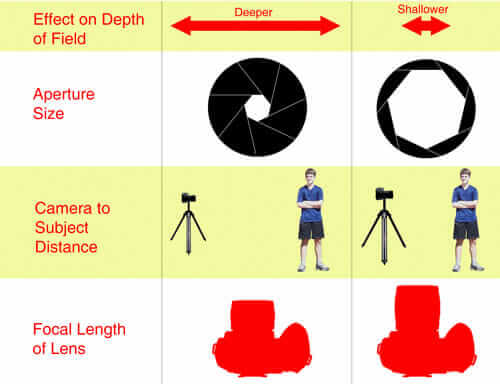
Three (3) major challenges of miniature photography
1. Model is too big
You want your entire model in-focus, but your model is too big to keep it all within the depth-of-field. Parts of the model are out-of-focus.

2. Too many models
Similar to having models that are too big to fit within the depth-of-field of your camera setup, having a lot of models that you want to photograph can also be problematic. Because you have so many miniatures you want to photograph, they may not all fit within your depth-of-field.

3. Poor lighting in an uncontrolled environment
This is especially true if you’re trying to photograph models in a game store or trying to take stills for a battle report; or, you’re simply at your painting desk and want to document your progress. In these situations, you may not have ideal lighting conditions which would force you (or your camera) to open-up the lens aperture.

RELATED: PHOTOGRAPHY LIGHTING TIPS FOR MINIATURE PHOTOGRAPHY
Unless you’re using a macro-lens, which is designed for placing your camera very close to your subject (i.e., your miniature(s)) at a specific focal length, photographing miniatures will often result in having too little depth-of-field to encompass your entire subject.
Best Solutions for Out-of-Focus Images Due to Shallow Depth of Field
A macro lens could overcome having a depth-of-field that is too shallow. But, there are weaknesses to macro lenses that I won’t get into here (pros and cons of macro lenses here).

You could use a tripod and photograph your models with a smaller aperture (e.g., higher f-stop number). As the more experienced photographers already know, you can close-down your aperture setting to increase the depth-of-field.

This approach works very well especially if you’re using a tripod and light box setup. Because there’s less light coming through your lens (as you close down your aperture), the stabilization of the tripod and increased light that you can place on your subject prevents the blurry and grainy images you might otherwise get (why do I get blurry/grainy photographs?).
What Camera Should You Use for Focus Stacking Miniature Photos?
“The best camera is the one you have with you.”
In other words, any camera you have will be a good tool to create focus-stacked composites as long as you’re able to capture digital images that can be used in Adobe Photoshop, i.e., JPEG, TIF, or RAW files–more on this later.

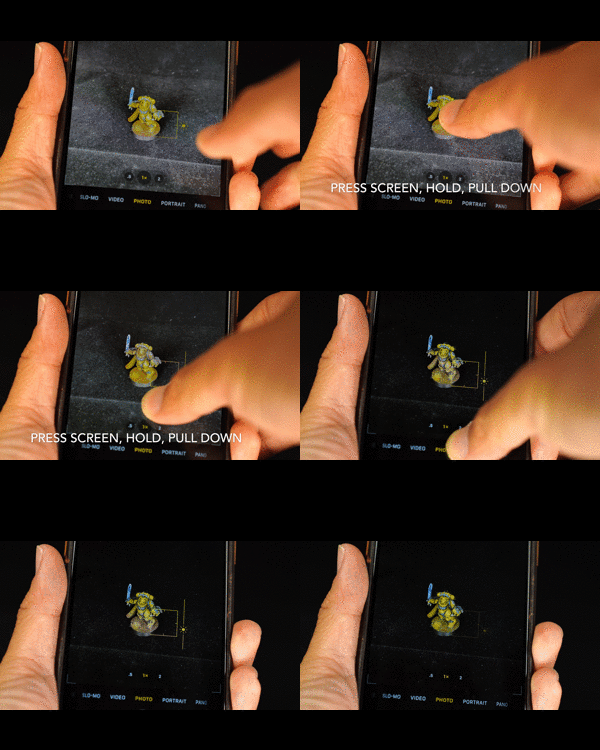
The other benefit of focus-stacking is that, usually, because the process of stacking literally combines the best elements of an image, the lower resolution images taken on the less expensive camera systems can produce final images that nearly rival the quality, or at least the look, of professional camera systems.
Here’s why I think a smart phone is great for photographing miniatures. I’ve personally tried focus stacking using my iPhone images and it works.
What software do I need for focus-stacking?
The best software I’ve found is Adobe’s Lightroom and Photoshop. You can get both pieces of software, which work together seamlessly for $10-12/month in Adobe’s Photography Plan. I’m sure there are free software packages that can help you stack multiple photos together, but Lightroom and Photoshop are the most popular for a reason.
They are easy to use and compatible with almost all image file formats. Nonetheless, the principles of focus-stacking described in this article could be translated into any software system that can has algorithms that know how to digitally merge photos together.
Free Step-by-Step Guide for How to Focus Stack Images

Check out this 13 step tutorial for how to use focus stacking to improve your miniature photos.
Conclusion
Miniature photography can be challenging due to depth-of-field limitations, but focus stacking offers a solution. By combining multiple images, each focused on different parts of the subject, you can achieve sharp, detailed photos.
This technique is accessible with any camera, including smartphones, and can be easily executed using software like Adobe Lightroom and Photoshop.
Finally, don’t be discouraged by equipment limitations. With focus stacking, you can enhance your miniature photography and capture intricate details with clarity and precision.
Enjoying Your Visit? Join Tangible Day
Free newsletter with monthly updates (no spam)


Tangible Day on YouTube (Miniatures and More!)